


































How to Hire React Developers: Skills, Interviews, Rates and Timelines
Hiring the right React developer starts with four steps: defining your project, testing practical skills, comparing the full cost, and planning the hiring timeline. With Mobilunity, for instance, you get the first relevant CVs within five business days, often sooner.
Years of React experience alone don’t make someone a senior developer, so your screening should focus on how candidates solve real problems with state, components, performance, testing, APIs, and TypeScript if required. If you plan to hire ReactJS developers, a short practical task can help you check these skills before moving forward. You should also compare the full cost of each hiring option, including taxes, recruitment, and paid leave. From there, the final timeline will depend on seniority, required skills, interview availability, and onboarding.
Decide What You Are Hiring Before You Write the Job Ad
Before you craft a React developer job description, decide whether you need a senior React specialist or a senior developer who can deliver a React project. Years of React experience alone don’t show how senior a developer is. This distinction can also help you evaluate platforms to hire React developers, since the candidate pool may include developers with different frontend backgrounds. Assess how they structure a new application, trace bugs across components and state, and move a feature from development through review, testing, and release.
The experience you need depends on the project. For a new app, look for someone who can plan the frontend structure and make technical decisions from the start. For a legacy migration, you need someone who can update old code without breaking the working product. For team extension, look for experience joining existing projects and following the team’s code review and release process.
Tech Recruiter at Mobilunity
“Mobilunity’s recruiters always clarify whether a client needs deep React expertise or a senior frontend developer who will work with React. Focusing too heavily on years of React experience can exclude strong senior developers with the right frontend background.”
As a hiring manager, focus on the experience the project actually requires, especially when you hire developers by technology. A developer with three years of React and broader frontend experience may make better architecture and debugging decisions than someone with eight years of React alone. Treat React experience as one part of seniority, not the main indicator.
The Six Skills to Test For, and How to Test Each
The React developer skills you need to test go beyond React syntax and APIs. Focus on how candidates solve problems they’ll face in your codebase, from managing state to handling failed API requests. Each check below takes about 10 minutes, even if you’re not a React expert yourself. The goal is to understand how candidates think, make technical decisions, and explain their choices.
State Management
A strong developer knows what data should stay within one component, what should be shared, and what should come from an API. For a 10-minute check, ask about a project where state became difficult to manage. Have them explain the problem, their solution, and why it worked better. Check the project’s framework and React version before treating specific patterns as answer criteria.
Component Architecture
Good component architecture means splitting a feature into parts with clear purposes. A senior developer knows what should stay together and what can be reused. For a quick test, show them a large component with several tasks. Ask what they would separate, what they would keep together, and why. Look for choices that make the code easier to change and reuse.
Performance and Rendering
A senior React developer should find the cause of performance issues and confirm that each fix works. Ask them to explain a real issue, what caused unnecessary rendering, and how they fixed it. Among the React developer skills you’re testing, look for evidence that they measured performance before and after the change.
Testing
Good tests check what users can do and what happens if an API request fails or data is missing. For a quick check, give the candidate a feature that loads data from an API. Ask what they would test for loading, success, and errors, and what problems each test could catch. Look for tests that cover real problems users could face.
TypeScript
A strong React developer uses TypeScript to catch errors before release and define what data the application expects. These skills are also important when you hire JavaScript developers for typed frontend projects. To test this skill, ask what they would do if an API returned unexpected data. A senior developer should know when TypeScript checks are enough and when the application needs to check the data itself. Look for an answer that clearly explains the difference between the two.
API Integration
A developer should know how to handle loading, no results, failed requests, and responses that arrive in the wrong order. While Node.js developers typically build the server-side APIs, React developers need to know how to work with those APIs on the frontend. To test this, ask what happens if a user searches for “react”, then “react developer”, but the first search returns last. Ask how they’d keep the newer results on screen. Look for a clear solution to this specific problem, not a general explanation of API calls.
Together, these checks show how a developer approaches real problems they’ll face in your project. You don’t need to know the exact technical solution yourself. Ask candidates to explain why they chose a certain approach, what alternatives they considered, and how they would check that their solution works.
Eight Interview Questions, and What a Good Answer Sounds Like
Technical knowledge alone doesn’t tell you how a developer will approach real challenges on your project. These eight React developer interview questions explore how candidates handle component architecture, state management, performance, testing, and debugging. Each question includes guidance on what a strong answer should cover and which answers call for a closer look.
1. You take over a React app where small changes often break other features. What would you do first?
What to expect: They review the code, identify where changes create the most risk, and check tests, component structure, and state flow before making major changes.
Weak-answer signal: They suggest rewriting the app before understanding why changes keep causing problems.
2. A React feature works, but the code is getting harder to maintain. Would you refactor it now?
What to expect: They consider future changes, the risk of breaking the feature, test coverage, and the time needed for refactoring.
Weak-answer signal: They always refactor or always leave working code alone, regardless of the situation.
3. A feature needs to ship this week, but the proposed approach could cause problems later. What would you do?
What to expect: They explain the risks, suggest another option, and decide which compromises are acceptable for a short-term solution.
Weak-answer signal: They accept the request or reject it without suggesting another approach.
4. Users report a bug that your team can’t reproduce. How would you investigate it?
What to expect: They check logs, error reports, browser details, and user actions to find what caused the bug.
Weak-answer signal: They start changing code without first finding the cause.
5. Your team wants to add React Server Components to an existing app. How would you decide where to use them?
What to expect: They consider which components need browser interaction, where the data comes from, and whether Server Components offer a clear benefit. Check the project’s framework and React version before treating specific implementation details as answer criteria.
Weak-answer signal: They recommend using Server Components everywhere without considering whether they’re needed.
6. AI generates a React component that works and passes the tests. Would you approve it?
What to expect: They review the code for errors, security issues, maintainability, edge cases, and gaps in the existing tests.
Weak-answer signal: They approve the code because it works and passes the tests.
7. A backend API will change next month, but your React feature needs to ship this week. How would you handle it?
What to expect: They separate the API response from the rest of the feature so the later change requires minimal updates.
Weak-answer signal: They build around the current API response without planning for the known change.
8. Tell me about a technical decision you changed after release. Why did you change it?
What to expect: They give a specific example, explain their original decision, and describe what showed them they needed a different approach.
Weak-answer signal: They can’t give an example or blame the outcome entirely on someone else.
You don’t need React expertise to evaluate answers to these React developer interview questions. Look for candidates who explain their choices in plain language, describe the risks, and say when they would choose this or that approach.
A 90-Minute Screening Task You Can Send Today
This task works best for mid-level and senior React candidates. Give them a ready-to-run starter project and a simple API so they can spend the 90 minutes on the actual problem.
React screening task: build a product-search page in React and TypeScript.
The page should:
- Search products as the user types and handle loading, error, and empty states
- Handle competing API requests correctly and avoid unnecessary requests
- Use a clear, extendable structure and include tests for at least two important user scenarios.
Spend no more than 90 minutes. Add a short README explaining your main decisions, what you’d improve with more time, and any AI tools you used.
Use this marking guide to review the result without React expertise:
| Area | What to Check |
| Functionality | The search works and shows loading, error, and empty states correctly |
| Problem handling | New search results stay on screen even if an older request finishes later |
| Testing | The candidate includes tests and explains what each test checks |
| Technical decisions | The candidate explains their main choices clearly and answers your questions about them |
You don’t need to judge the React code yourself. Use the task to confirm that the feature works and that the candidate can explain their decisions clearly.
What It Costs: Rates by Region and the Real In-house Comparison
How much does it cost to hire a React developer? The answer depends on seniority, location, and hiring model. The React developer hourly rate can differ substantially between the US and offshore markets, so compare the full monthly cost rather than the hourly rate alone.
For a closer look at individual markets, explore our React developer salaries by country guides.
React Developer Monthly Gross Salary Rates
Monthly React developer cost varies widely by region and experience level. Rates also vary within individual regions. Even within Eastern Europe, rates can differ between markets. The table below compares estimated gross monthly salary ranges for middle, senior, and lead developers across four major hiring regions.
React Developer Monthly Salary Ranges by Region and Seniority*
| Region | Middle | Senior | Lead |
| Eastern Europe | $2,200-$4,200 | $4,200-$5,700 | $5,700-$6,700 |
| Western Europe | $3,800 – $5,800 | $5,500 – $8,200 | $8,000 – $11,000 |
| Latin America | $2,200 – $3,800 | $3,800 – $5,800 | $5,500 – $8,000 |
| North America | $7,500 – $10,000 | $10,000 – $14,000 | $13,500 – $18,000+ |
Sources: dou.ua | Stack Overflow | Levels.fyi | Payscale | OfferZen | Glassdoor | ZipRecruiter | Indeed
*All rates are as of September 2026
Their salary ranges provide a benchmark for developer compensation, but the total cost of hiring depends on your engagement model. For an in-house hire, additional expenses include employer taxes, benefits, recruitment, paid leave, equipment, and onboarding. When hiring through a provider, the monthly fee combines developer compensation with the services and support included in the agreement.
For a concrete example, the table below shows monthly costs by developer seniority:
Monthly Cost of Hiring a React Developer Through Mobilunity*
| Seniority | Monthly Cost |
| Middle | $3,650-$5,700 |
| Senior | $5,650-$7,200 |
| Team Lead | $7,150-$8,200 |
*As per Mobilunity in-house tech recruiting team research done in September 2026
What an In-house Developer Really Costs
A developer’s salary is only part of the total cost of an in-house hire. Employers also pay mandatory taxes and social contributions, while benefits add another layer of expense. These costs vary considerably between countries because each has different employment rules and common benefit practices.
The table compares the estimated annual cost of hiring a React developer in eight markets, based on average gross salaries and country-specific employer costs.
Gross salary: Average annual React developer salary based on current salary-market data.
Employer taxes/contributions: Mandatory employer payroll taxes and social contributions calculated under local rules.
Estimated benefits: Employer costs based on available national pension, insurance, and employee-benefit benchmarks.
Estimated annual in-house cost: Gross salary plus employer taxes/contributions and estimated benefits.
Estimated Annual In-House React Developer Cost*
| Average Annual Gross Salary | Employer Taxes / Contributions | Estimated Benefits | Estimated Annual In-House Cost | |
| US | $105,900 | $8,100 | $17,300 | $131,300 |
| Canada | $56,100 | $4,300 | $3,900 | $64,300 |
| Germany | $57,800 | $12,200 | $2,300 | $72,300 |
| UK | $65,300 | $8,800 | $3,900 | $78,000 |
| Switzerland | $133,800 | $8,600 | $10,000 | $152,400 |
| Denmark | $74,400 | $1,200 | $6,500 | $82,100 |
| France | $52,600 | $19,200 | $1,300 | $73,100 |
| Spain | $43,200 | $13,200 | $800 | $57,200 |
Sources: BuiltIn | Glassdoor | Indeed | TalentUp | IRS | Canada | gov.uk | ahv-iv.ch | seg-social.es | bls.gov | ons.gov.uk | destatis.de | ine.es | www150.statcan.gc.ca | OECD | bsv.admin.ch | urssaf.fr
*All rates are as of September 2026
Gross salary is only one part of the cost of hiring an in-house React developer. Employer contributions and benefits can significantly increase the total employment cost. When comparing hiring models, consider the full cost alongside developer experience, location, and the expenses each model already covers.
Dedicated Team vs Freelancer vs In-house Hire
The right way to hire ReactJS developers depends on your project requirements and the type of support you need. Freelancers often suit short-term work, while ongoing product development may call for an in-house or dedicated developer who stays involved with your team.
If you want to hand over a defined project, a React development company can manage delivery from the initial brief through to release. If your internal team wants to set priorities and manage the day-to-day work, a dedicated team or staff augmentation model gives you more control.
In-house hiring works well when you want a developer to stay with the product and build up knowledge over time. You also have more control over their day-to-day work. In return, your company handles recruitment, technical screening, employment costs, and ongoing management.
Freelancers work well for projects with a clear scope and end date. You may hire one for a prototype, UI redesign, or specific React feature instead of adding a permanent developer. Before the project starts, agree on code ownership, documentation, bug fixes, handover, and future maintenance.
The DDT (dedicated development team) model gives you another way to hire React JS developers without handling recruitment and employment yourself. Tech experts work with your existing team and processes, while you manage their priorities and daily work. At Mobilunity, 97% of consultants successfully complete their trial period, helping clients move from initial onboarding to ongoing collaboration.
The model fits ongoing projects where continuity matters. Across Mobilunity’s client projects, retention for placed developers reached 94% over the past 12 months, though results vary by client and project. For short-term or small-scale React projects, this model may be less cost-effective.
| Dedicated Team | Freelancer | In-house Hire | |
| Cost structure | Monthly provider rate | Hourly or project fee | Salary plus employment overhead |
| Ramp time | Recruitment and onboarding required | Often faster for bounded work | Recruiting plus internal onboarding |
| Retention | Designed for ongoing engagement | Depends on freelancer availability | Strong potential for long-term collaboration |
| IP | Defined in service agreement | Must be addressed in contract | Typically covered by employment agreement |
| Management overhead | Client manages delivery; provider handles employment | Client manages scope and handover | Client manages both employment and delivery |
Your project length and ownership needs should guide the hiring model you choose. Choose a freelancer for short-term work, an in-house developer for long-term internal ownership. IT staff augmentation and the DDT model are two options when you need external developers to work with your existing team and processes. If you first need help defining the architecture, reviewing an existing codebase, or setting technical requirements, you can hire a React consultant before building the delivery team.
Red Flags in a React CV and in the First Call
A strong CV doesn’t always show the full picture. These red flags aren’t reasons to reject a candidate, but they can show where you need to ask more questions.
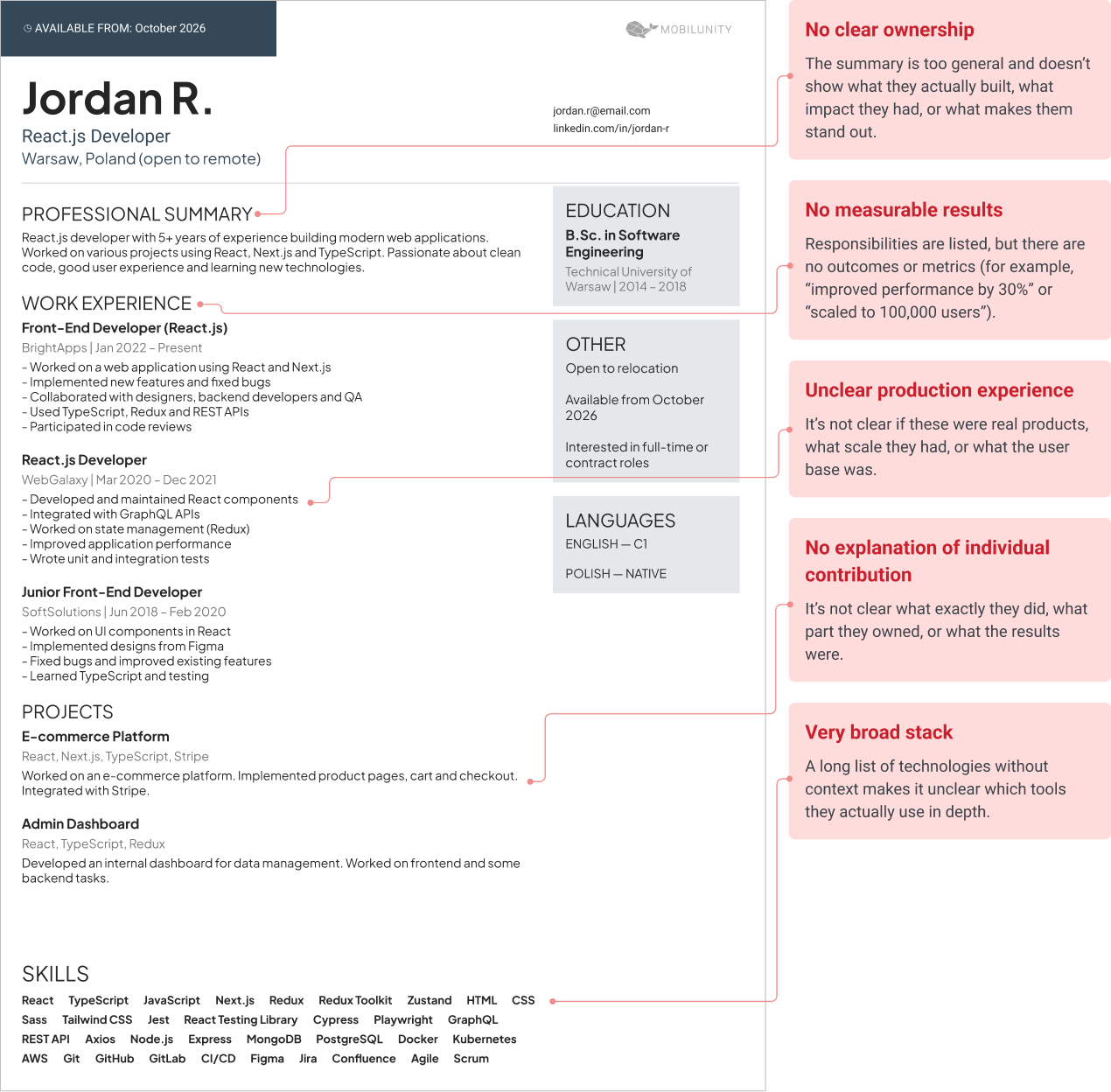
- React listed for years, but no clear project ownership. The CV shows several years of React experience but no examples of features or technical decisions the developer owned. This may mean they had a smaller role in those projects than the CV suggests.
- Tasks listed without clear results. The candidate mentions building components, fixing bugs, or connecting APIs but doesn’t explain the results. This may mean they mostly completed assigned tasks rather than taking broader responsibility.
- Very broad stack with little depth. When hiring for offshore React development, you may review developers with experience across many technologies and projects. If a CV lists React, Angular, Vue, Node.js, mobile frameworks, and cloud platforms, check which ones the candidate has actually used in production recently. For a mobile project, prioritize candidates with proven experience as React Native developers rather than assuming React web experience transfers directly.
- No examples of difficult debugging. During the first call, the candidate struggles to describe a bug that took real investigation. For a senior hire, this can point to limited experience with complex production issues.
- Little independent decision-making. During the first call, the candidate says that architects, leads, or clients made most technical decisions. This may mean they have less experience making technical choices on their own.
- Vague answers about testing. They say testing is important but can’t explain what they tested on a recent React feature. This often indicates limited hands-on responsibility for release quality.
- No clear explanation of their own contribution. The candidate talks about what the team built but can’t clearly explain their own work. This makes it harder to judge their React experience and responsibilities.
Don’t reject a candidate based on one red flag. Instead, use these signs to decide what to explore further before the technical task or final interview.
How Long It Takes, Brief to First CV
The hiring timeline depends on how specific your React requirements are and how quickly your team can interview candidates. At Mobilunity, we typically provide the first relevant CVs within 5 business days, and often sooner.
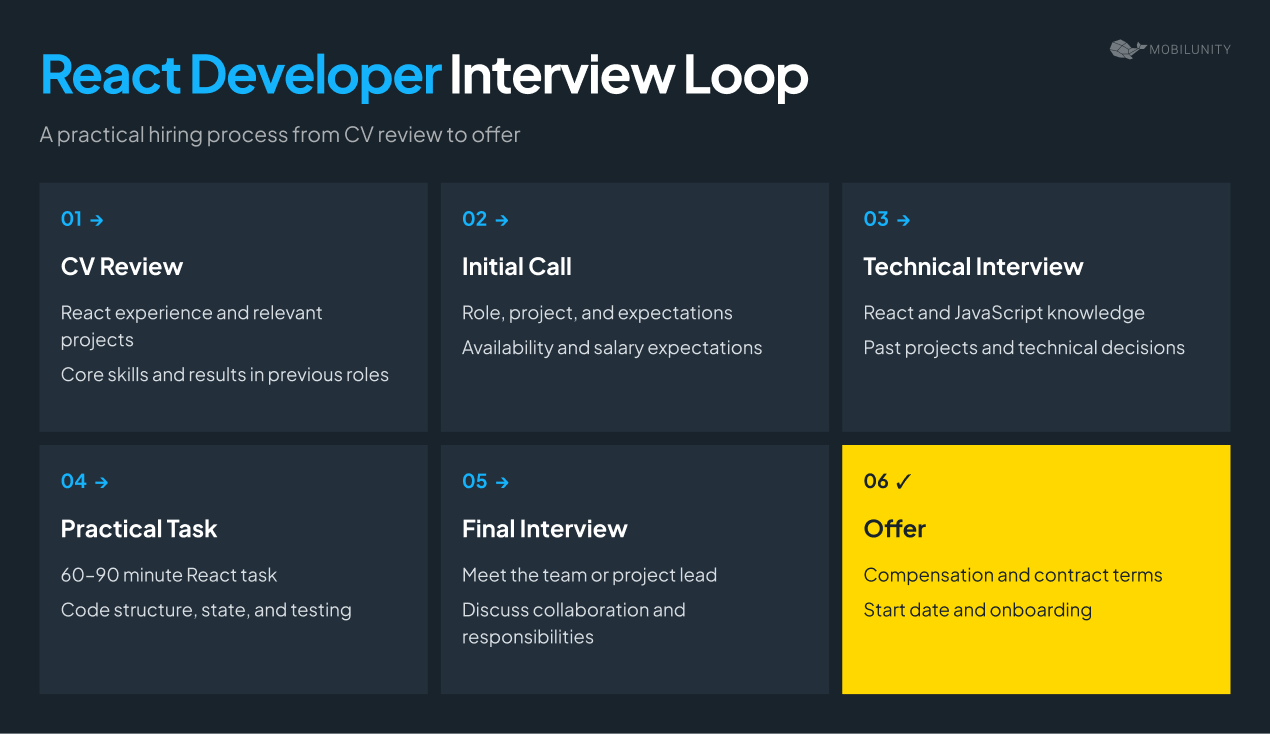
Week 1: You share your requirements, Mobilunity starts sourcing and screening, and you get the first CVs of highly relevant applicants.
Week 2: You review candidates and run technical and team interviews. If you find the right developer, we move to an offer and onboarding.
Week 3 and beyond: If the first candidates aren’t the right fit, the search continues based on your feedback.
The timeline can change when you need a senior developer, mandatory TypeScript or Next.js experience, complex migration skills, specific time-zone overlap, or backend knowledge. Your team’s interview availability can also affect the timeline.
Once you select a developer, onboarding starts with access to the codebase, development tools, and project documentation. Your team then introduces its workflows, coding standards, and review process before assigning the developer’s first task.