








































How to Hire Android Developers: Skills, Interviews, Rates and Timelines
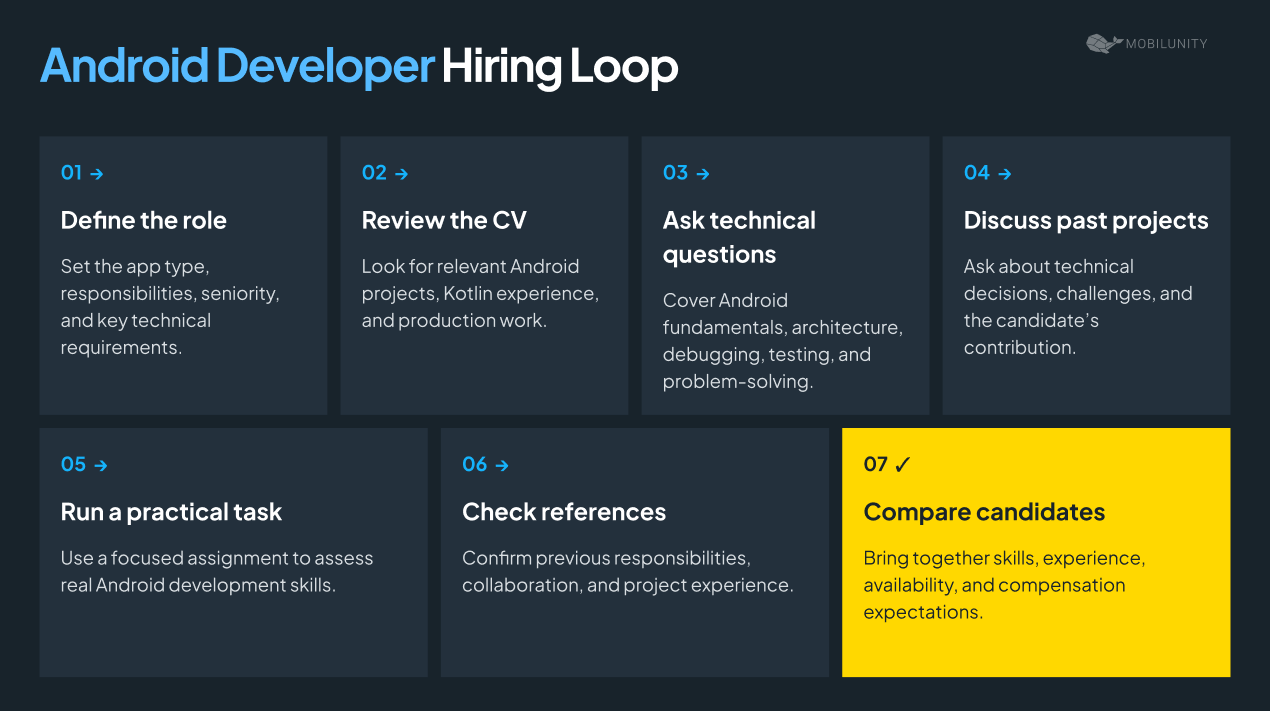
The right Android developer should match your product, technical requirements, and level of ownership. Start by defining the app and its complexity, then look for proven Kotlin and Android skills, relevant production experience, and the ability to solve real development problems.
The interview should test more than framework knowledge. Ask how candidates approach architecture, debugging, APIs, testing, performance, and app releases, and use a short practical task to verify their answers.
Rates and hiring timelines vary mainly by seniority, location, and hiring model. A strong hiring decision comes from matching those factors to the actual workload, rather than choosing a developer based on a job title or years of experience alone.
What to Expect From an Android Developer on Your Project
Android developer’s skill set usually includes several distinct areas, and most job ads ask for strength in these 5 when a given project only needs two or three:
- Building new features in Kotlin
- Maintaining older Java code
- Cross-platform work (Flutter, React Native)
- Integrating third-party SDKs and libraries
- Managing Play Store releases
Building new features in Kotlin is the bulk of active Android work today, since Kotlin replaced Java as the default several years ago. A strong candidate has taken a feature from design through build, test, and release on their own, start to finish. A weak one can describe Kotlin syntax correctly but has only ever patched small pieces of someone else’s feature, without ever owning one end to end.
Maintaining older Java code is a separate, still-common job, not a lesser version of the first. Plenty of production apps still carry Java modules that predate the Kotlin shift, and someone has to keep them running and patch security issues as they surface.
A strong candidate works comfortably inside code they did not write, without breaking things, and can point to a specific piece of it they helped migrate toward Kotlin. A weak one claims Java experience “in theory,” with no actual maintenance work behind it. Mobilunity’s Java developers guide covers this hire on its own, since the two skill sets often can be found in different people.
Cross-platform work, using a toolkit such as Flutter or React Native to build one app that runs on both Android and iPhone, is a different approach from native Android development, not an extension of it. The tools, debugging process, and day-to-day workflow are different enough that strength in one does not transfer cleanly to the other.
If a project needs both platforms from a single codebase, it needs a cross-platform developer, not a native Android developer stretched to cover a job they were never hired for.
Integrating third-party SDKs and libraries is invisible when done well and expensive when done badly.
A strong candidate can name a specific integration they owned end to end, including how they handled its failures when that outside service went down. A weak one has only ever copied setup instructions from a vendor’s documentation without ever touching what happens when something breaks.
Managing Play Store releases covers staged rollouts, crash monitoring, and rollback decisions once an update is live. Our Android build checklist walks through the release process step by step.
A strong candidate can describe an actual release schedule they have run, including a time it went wrong and what they changed afterward. A weak one has only ever pushed straight to every user at once, with no staged process and no story about a release that failed.
Which of these five areas actually matters depends entirely on the project. A consumer app with millions of installs lives or dies on the fifth item, since a bad rollout reaches real users within hours.
Decide What You Are Hiring Before You Write the Job Ad
Before you write an Android developer job description, answer three questions: what shape is the project, how much judgment will this person need to exercise alone, and does the app genuinely need to be native Android at all. Years on a resume answer none of these three questions by themselves.
What shape is the project?
- A greenfield build, a new app from scratch, needs someone who has made real architecture decisions before and lived with the consequences of those decisions later.
- Legacy maintenance, keeping an existing app running and slowly modernizing it, needs patience and comfort working inside code someone else wrote.
- Team extension, joining a team on an app that is already shipping, needs someone who ramps fast and communicates well, more than someone who arrives with strong personal opinions about architecture.
How much autonomy does this role actually require? A solo Android hire at a small company has no one else to check their reasoning day to day, so they need to be comfortable making calls independently and defending them later. A hire joining a team of several Android developers can lean on code review instead, which shifts the bar toward communication and away from pure independent judgment.
Does this need to be native Android? Ask how much Android-specific behavior the app genuinely needs, and whether you will also need iPhone support down the line. If the honest answer to the first is “not much” and the second is “yes, eventually,” React Native developers hire may serve the project better than a native Android specialist.
Years of Android experience alone do not answer these questions, and this is exactly where a lot of hiring managers go wrong. A developer with three years of Android work plus broader mobile and backend experience can often make better architecture and debugging decisions than someone with eight years of Android alone, gained on a single, narrow project.
Treat Android experience as one input into seniority, not the main one, especially when you compare candidates who come from noticeably different backgrounds. This distinction also matters if you are comparing platforms to hire Android developer, since the candidate pool on any given platform can include people with very different frontend and mobile histories behind the same job title.
For junior and mid-level hires specifically, motivation and evidence of self-teaching predict success better than a candidate’s current Android knowledge does. A junior who has clearly taught themselves outside of work, through a personal project on the Play Store or contributions to an open-source library, tends to outperform one with a longer resume but no visible curiosity.
Candidates increasingly rehearse interview answers, and a well-rehearsed answer rarely survives a specific, concrete follow-up question about their own actual work. If an answer sounds polished but generic, ask what specifically they built, what broke, and how they knew it was fixed; a memorized answer will not hold up under that kind of pressure.
Answer the three questions above first, and the seniority level and rough budget for the role follow from them rather than the other way around. You can check our hire developers by technology guide if you are weighing this role against others you are staffing on the same project at the same time.
The Six Skills to Test For, and How to Test Each
The Android developer skills you actually need to test go well beyond Kotlin syntax and Android APIs. Focus on how a candidate handles the specific problems your app will throw at them: a screen that loses data, a release that has to be pulled back, a phone that runs low on memory. Each check below takes about ten minutes, even if you have no technical background yourself.
Kotlin in Practice
Kotlin relies on two tools worth knowing before you interview for it: coroutines, which run tasks like a network call in the background without freezing the app while it waits, and null safety, Kotlin’s built-in way of catching, before the app even runs, places where the code might try to use a value that does not exist.
Ask this: show the candidate a short snippet with a background task launched inside a screen without being tied to that screen’s lifecycle, so the task keeps running after the screen closes. Ask what is wrong with it.
What to expect: they spot the missing link immediately and explain what happens if the screen closes before the task finishes. They can also describe a real bug from their own past, such as a skipped null-check or a call that froze the app.
Weak-answer signal: heavy prompting is needed before they see the problem, or they describe Kotlin’s safety features correctly in the abstract but cannot connect them to a bug they have actually hit.
This matters because coroutine and null-safety mistakes rarely show up in a quick demo. They surface weeks later, in production, as a crash that only happens for a fraction of users under specific conditions.
The Android Lifecycle
Every screen in an app goes through a lifecycle: it starts, it can be paused, and it can be shut down entirely by the operating system without the user asking for that to happen. Two events inside that lifecycle cause the most common class of bugs that automated tests never catch, because they only show up on a real device.
These two events are a configuration change (something as ordinary as the phone rotating) and process death (the system quietly shutting the app down in the background to free up memory, without the user noticing).
Ask this: describe a form the user is halfway through filling out. Ask what happens to that data if the app sits in the background for 20 minutes on a low-memory phone and is then reopened.
What to expect: they flag this as a process-death scenario, not just a rotation, and name a fix that survives it. They have a specific story about a bug that only showed up after an app sat backgrounded for a while.
Weak-answer signal: they only talk about surviving screen rotation, with no separate mention of the background shutdown case at all.
This is the single most common source of the “I can’t reproduce this bug” complaint from users, since process death almost never happens on a developer’s own phone while they are actively testing.
Jetpack Compose Versus Views
Android apps are built using one of two toolkits for the screens themselves: an older one called Views, and a newer one called Jetpack Compose, which Google now treats as the default going forward. Most production apps still have some older, Views-based screens even where new work is built in Compose.
Ask this: which toolkit did they ship on their last app, and how would they add a single new Compose screen into an app that is otherwise built the older way.
What to expect: a clear preference, paired with a real snag they hit bridging the two toolkits, usually inconsistent visual styling between them.
Weak-answer signal: a flat refusal to work in the older toolkit at all, or no ready answer on how the two connect, which is a fair gap to flag rather than penalize outright depending on your app’s age.
This matters most for any app older than a couple of years, since a full rewrite to the newer toolkit is rarely worth the cost, and most teams live with both for a long stretch of the app’s life.
Release and Store Discipline
Getting an update out to users safely, and pulling it back quickly if something goes wrong, is a different skill from writing good code in the first place. This includes a staged rollout, plus ongoing crash monitoring once an update is live.
Ask this: what share of users do they typically release an update to first, and why that specific figure.
What to expect: an actual number in mind, often somewhere between one and ten users out of a hundred for the first stage, tied to a real story about a release they had to pull back.
Weak-answer signal: releasing to everyone immediately every time, with no staged process and no rollback story, which carries more production risk than most buyers realize until the first bad release.
A candidate who treats this as optional overhead, rather than a basic safety net, is telling you something important about how much risk your app will carry once it has real users.
Performance on Real Devices
Battery drain, memory use, and how long an app takes to open all behave very differently on an older, cheaper phone than on a testing simulator or the developer’s own top-of-the-line device.
Ask this: name the least powerful phone they have personally tested on in the last year, and what they found.
What to expect: a specific older or budget model, and a specific number or fix that came directly out of testing on it.
Weak-answer signal: no device named beyond their own phone or a simulator, and only a general statement that “performance matters” with nothing concrete behind it.
Backwards Compatibility
Every Android app sets a minimum SDK, the oldest version of Android it agrees to run on, and that is a business decision with a real cost, not just a technical setting. Supporting older versions means giving up newer features and doing more device-specific testing; requiring a newer version cuts off users still on older phones.
Ask this: what minimum version have they argued for on a past project, and what would change in the code if that requirement were raised tomorrow.
What to expect: a real tradeoff they made, plus specific old workarounds that could be deleted if the minimum were raised, and an opinion on whether that is worth the users it would lose.
Weak-answer signal: “nothing would change.” That usually means they have not thought carefully about what the tradeoff actually costs.
Run these checks across two conversations rather than cramming all of them into one session if you can. Candidates give sharper, more specific answers earlier in an interview, before fatigue sets in, and asking all six in a single sixty-minute block often means the last two get rushed on both sides.
If you only have time for three of the six before deciding whether to move a candidate forward, prioritize the Android lifecycle, release discipline, and backward compatibility. These three surface the most about how a candidate thinks about real users and real risk, while Kotlin fluency and Compose-versus-Views familiarity are often easier to assess later, once you already know the candidate is otherwise strong.
Together, these six checks show how a candidate approaches real problems they will face on your project, not how well they have memorized Android terminology. You do not need to know the technical solution yourself. Ask why they chose a particular approach, what alternative they considered, and how they would confirm their fix actually works.
Seven Interview Questions, and What a Good Answer Sounds Like
These seven Android developer interview questions are written for a hiring manager who is not an Android engineer. Each one is designed so you can tell a real answer from a rehearsed one, even without deep technical background yourself.
None of these questions ask a candidate to write code on the spot, which is deliberate. Whiteboard coding under pressure tests how well someone performs under stress, not how they actually work day to day. A candidate who freezes on a live coding puzzle but gives thoughtful, specific answers to the questions below is very often the stronger long-term hire.
1. Describe a bug caused by process death or a configuration change.
One is the app quietly being shut down in the background; the other is something as ordinary as the phone rotating, both explained in the skills section above.
Why we ask: this is the fastest way to tell someone who has genuinely debugged a production app from someone who has only worked on a personal project that never had enough real users to hit this class of bug.
What to expect: a specific answer naming the screen, what got lost, how they found it, and what they changed.
Weak-answer signal: the answer stays abstract and never names an actual bug.
2. What did your Java habits cost you when you moved to Kotlin?
Why we ask: every developer who genuinely switched languages made at least one real mistake along the way, and how they talk about it tells you whether they have actually reflected on their own growth.
What to expect: a real, admitted mistake, usually a skipped null-check, a call that froze the app, or something overcomplicated out of old habit.
Weak-answer signal: a claim that the switch was seamless with zero missteps.
3. Compose or Views on your last app, and could you work in the other?
Why we ask: most real apps still mix both toolkits, so a developer’s comfort moving between them predicts how quickly they will be productive in your actual codebase, not just in a greenfield project.
What to expect: a clear answer on which one shipped, plus a believable account of touching the other.
Weak-answer signal: total unfamiliarity with one, with no acknowledgment of the gap at all.
4. Tell me about a release you rolled back. What did you change afterward?
Why we ask: the incident itself matters less than whether the candidate treats it as a learning moment or as a one-off they would rather not think about again.
What to expect: a concrete process change, such as releasing to fewer users first next time or tightening crash alerts.
Weak-answer signal: they describe the incident but cannot name anything that actually changed because of it.
5. How do you test on low-end devices, and what have you found that way?
Why we ask: this question separates developers who think about your actual user base from those who have only ever tested on their own current-generation phone.
What to expect: a real device named, not just a simulator, and ideally a bug that only showed up on it.
Weak-answer signal: the answer is entirely about simulators, with no mention of a real phone.
6. What minimum SDK do you argue for, and why?
Why we ask: this is a business tradeoff disguised as a technical setting, and a candidate’s answer shows whether they think about your users or only about their own convenience as a developer.
What to expect: real usage data cited, and a specific feature gained or given up by that choice.
Weak-answer signal: a number picked because it “seemed reasonable,” with no data or tradeoff behind it.
7. When is native Android the wrong choice? The honesty test.
What to expect: a real project named, often a simple content-focused app or an early version with a tight budget, where they recommended against going native.
Weak-answer signal: an inability to name a single scenario where native Android would be the wrong call, which usually means they are selling you rather than advising you.
No single question above should carry the whole decision. A candidate can give a weak answer to one question and still be a strong hire overall, especially on question 5 or 6, which test for specific habits (testing on real low-end devices, keeping up with newer Android patterns) that even good developers sometimes haven’t had the chance to build yet at a smaller company. Treat a single weak answer as a topic to probe further in a follow-up conversation, not as an automatic disqualifier.
Watch instead for a pattern across two or three questions. A candidate who gives vague, generic answers to questions 1, 4, and 7 together is telling you something more reliable than any one of those answers alone: they may not have owned enough of the full lifecycle of a feature, from build through a production incident through a later fix, to have the specific stories these questions are designed to surface.
It also helps to notice how a candidate handles not knowing something. Android changes constantly, and a strong candidate who has not touched React Server Components’ Android-adjacent equivalents, or has not worked with the newest Compose APIs, will usually say so plainly and reason through the question anyway.
A candidate who bluffs through unfamiliar territory rather than admitting the gap is a worse sign than the gap itself, since bluffing under low-stakes interview conditions tends to predict bluffing under higher-stakes production conditions later.
If you are running these questions with a panel rather than one interviewer, assign each panelist two or three questions rather than having everyone ask all seven. This keeps the total interview time reasonable and gives each interviewer enough attention to actually listen for the specific details these questions are designed to surface, rather than splitting their focus across the full set.
Run all seven in a single 45-to-60 minute call, roughly five to seven minutes each with the seventh left open-ended at the end. None require the interviewer to read code; all require noticing the difference between a specific story and a well-rehearsed generality.
You do not need Android expertise to evaluate these answers. Look for candidates who explain their choices in plain language, name real risks, and say clearly when they would choose one approach over another.
A 90-Minute Screening Task You Can Send Today
This task works best for mid-level and senior Android candidates. Give them a ready-to-run starter project so they can spend 90 minutes on the actual problem rather than on setup.
Android screening task: fix a small, self-contained Android screen (a simple form or list is enough) that has two deliberate bugs built in.
The task should:
- Fix a screen that forgets what the user typed if the phone is rotated
- Fix a background task that is not properly tied to the screen, so it keeps running after the user leaves
- Add one automated test that would have caught the first bug
- Include a short explanation, in plain English, of what was wrong and why each fix works
Spend no more than 90 minutes. Add a short note explaining the main decisions made, what would be improved with more time, and whether any AI tools were used along the way.
Use this marking guide to review the result without any Android expertise of your own:
| Area | What to Check |
| State handling | What the user typed survives not just a screen rotation, but also the app being shut down in the background |
| Task scoping | The background task stops automatically when the user leaves the screen, rather than being left running |
| Testing | The added test actually fails against the original, buggy code, not just against the fixed version |
| Explanation | The plain-English explanation is genuinely readable by someone who does not write code |
This work is licensed for the candidate to keep and reuse; nothing about the exercise obligates them to sign anything away. It is good practice to say so explicitly when you send it, since candidates are understandably wary of unpaid work that turns into free labor.
90 minutes is deliberately tight, long enough to separate real understanding from memorized vocabulary but short enough to avoid becoming a second unpaid job. If a candidate comes back well past the mark with an over-engineered solution, apply the marking guide to what was actually delivered, not to how much extra time went into it.
Sending this before a full interview loop saves everyone’s time. A candidate who cannot pass the first two rows of the marking guide is unlikely to pass a live technical interview either, and finding that out asynchronously is cheaper for both sides than finding it out partway through a scheduled call.
One practical note on grading: avoid judging code style or naming conventions. Those are matters of taste that vary by team, and penalizing a candidate for writing code slightly differently than your own team would is a common way to reject strong candidates for the wrong reason. Stick to the four rows in the table above.
What It Costs: Rates by Region and the Real In-house Comparison
Android developer cost varies by seniority, location, and hiring model, and the Android developer’s salary quoted on a job board rarely tells the whole story on its own. Compare the full monthly cost of each option rather than a single headline number.
Android developer rates, Ukraine-based engineers*
| Seniority | Gross monthly salary | Monthly developer cost with Mobilunity |
| Junior | $1,200 to $2,300 | $2,650 to $3,800 |
| Middle | $2,300 to $4,500 | $3,750 to $6,000 |
| Senior | $4,500 to $5,700 | $5,950 to $7,200 |
*As per Mobilunity in-house tech recruiting team research done in September 2026
Android Developer Monthly Salary Ranges by Region and Seniority
| Region | Junior | Middle | Senior |
| Eastern Europe (Ukraine) | $1,200-$2,300 | $2,300-$4,500 | $4,500-$5,700 |
| Western Europe (Germany) | $3,750 | $6,175 | $6,665-$7,290 |
| Latin America (Brazil) | $1,930 | $2,685 | $3,105 |
| North America (US) | $8,225 | $8,885 | $12,205-$13,360 |
As of September 2026
Sources: Glassdoor (Germany, US) | Payscale, SalaryExpert (Brazil).
For comparison, a Berlin-based Android developer averages roughly $84,500 a year across all seniority levels combined, a London-based one roughly $65,000, and a Bengaluru-based one roughly $12,000.
The headline US salary for an Android developer undersells the actual cost of hiring one in-house. Glassdoor’s own median across all seniority levels sits around $106,600 a year as of September 2026, with a typical range of about $81,000 to $141,000 depending on level and location.
Three separate costs sit on top of that base salary, and buyers who only budget for salary are often surprised by the total.
Employer-side benefits and payroll load. The Bureau of Labor Statistics’ Employer Costs for Employee Compensation report, released June 2026, found that for full-time private-industry workers, benefits accounted for 31.5 % of total compensation on top of wages. A $106,600 salary carries roughly another $49,000 in employer costs before the person has done a day of work.
Recruiting cost. SHRM’s 2025 Benchmarking Report put the average cost per hire for a non-executive role at $5,475, covering job board spend, recruiter time, and screening tools.
Bench time and ramp-up. An in-house hire is rarely productive on day one, and the weeks between the offer and full productivity are a real cost even though they rarely show up on a spreadsheet.
Put together, a fully loaded US in-house Android hire commonly runs well over $150,000 a year once benefits, recruiting, and ramp time are counted. That gap between the job-posting number and the finance team’s actual spreadsheet is the single most common source of budget surprises in mobile hiring.
The comparison looks different once currency and cost of living are factored in properly. A senior Android developer in Berlin, at roughly $84,500 a year in base salary, sits well below a comparable US senior hire even before US benefits load is added.
Germany’s own employer social contributions add a meaningful percentage on top too; Eurostat put non-wage costs at close to a quarter of total labour costs across the EU as of 2025, though this varies by country.
What an In-house Developer Really Costs, by Country
A developer’s salary is only part of the total cost of an in-house hire. Employers also pay mandatory taxes and social contributions, and benefits add another layer on top. These costs vary considerably between countries, since each has different employment rules and different common benefit practices.
The table below estimates the annual cost of hiring an Android developer in eight markets, based on average gross salaries and country-specific employer costs.
- Gross salary: average annual Android developer salary based on current market data.
- Employer taxes/contributions: mandatory employer payroll taxes and social contributions under local rules.
- Estimated benefits: employer costs based on typical national pension, insurance, and benefit practices.
- Estimated annual in-house cost: gross salary plus employer taxes/contributions and estimated benefits.
Estimated Annual In-House Android Developer Costs*
| Country | Average Gross Salary | Employer Taxes / Contributions | Estimated Benefits | Estimated Annual Cost |
| US | $106,600 | $8,150 | $17,400 | $132,150 |
| Canada | $90,000 | $6,900 | $6,300 | $103,200 |
| Germany | $84,500 | $17,850 | $3,400 | $105,750 |
| UK | $65,000 | $8,800 | $3,900 | $77,700 |
| Switzerland | $120,800 | $7,700 | $9,100 | $137,600 |
| Denmark | $75,000 | $1,200 | $6,500 | $82,700 |
| France | $46,400 | $16,950 | $1,150 | $64,500 |
| Spain | $51,000 | $15,600 | $950 | $67,550 |
Sources: Glassdoor and Payscale for gross salaries (US, Germany, UK, Switzerland, France) | published employer social-contribution rates from IRS, Canada.ca, gov.uk, ahv-iv.ch, seg-social.es, destatis.de, urssaf.fr, and OECD data on non-wage labor costs.
*All rates are as of September 2026
Gross salary is only one part of the cost of hiring an in-house Android developer. Employer contributions and benefits can add a quarter to a third of the base salary in some countries, and close to nothing in others, which is exactly why a single global average is not a useful number to plan a budget around.
None of the regional averages above should be treated as a quote. They are a starting point for a conversation with a specific provider, not a number to lock a budget against.
An Android hire is often, in practice, half of a mobile hiring problem. If your product needs iPhone as well, price both roles now. Teams that hire Android first and discover the iPhone need three months later usually pay a premium for the second hire, made under time pressure with a smaller pool to draw from.
Currency movement alone can shift a quoted rate by several points within a single quarter, which is why every figure here carries the date it was checked. It is also worth separating two numbers buyers tend to conflate: the developer’s own take-home pay, and the total cost to the hiring organization. Every figure in the rate table above is a gross salary or an all-in hiring cost from the buyer’s side, not a take-home number.
One more factor worth budgeting for that rarely appears in any rate table: the cost of a bad hire. Replacing an Android developer three months into a role, after a failed probation period or a mismatch that only became clear on the job, typically costs more in lost time and re-recruiting than the gap between a merely acceptable candidate and a genuinely strong one would have cost upfront. This is the practical argument for spending real time on the interview questions and screening task above rather than moving straight from resume to offer.
Dedicated Team vs Freelancer vs In-house Hire
The right way to hire Android developers depends on your project’s shape and how long it will need ongoing care, not on rate alone. Each of the three models below is genuinely the right answer for some projects, and the honest case for each includes when it is not.
In-house hiring gives you the most control and the deepest institutional knowledge over time. The supply of competent Kotlin developers is reasonable in most major tech hubs. But if you need someone who knows Android internals inside and out, expect a long search.
Freelance hiring works well for a bounded, well-scoped build: an early version of an app, a proof of concept, or a single feature with a clear finish line. It works poorly for anything where store releases and crash triage continue after the initial build, since a freelancer who has moved to their next contract is not available at 11 pm when a release starts crashing for one in ten users.
A dedicated team’s honest pitch is continuity through the release cycle, not just through the build. Mobile projects rarely fail during initial development; they fail three months after launch, during the unglamorous work of triaging crash reports and shipping small fixes on a predictable cadence. Mobilunity’s dedicated development team model and broader IT staff augmentation offering are both built around that continuity.
| Factor | In-house | Freelancer | Dedicated team |
| Cost | Highest, once benefits and recruiting are counted | Lowest for a bounded scope | Mid-range, predictable monthly |
| Ramp time | Slowest, full recruiting cycle | Fastest for a well-scoped task | Fast, pre-vetted talent pool |
| Retention through release cycle | Depends on your own retention | Weak; engagement usually ends at delivery | Strong; built for ongoing work |
| IP and knowledge continuity | Full control | Must be addressed in contract | Strong, with contractual protections |
| Management overhead | Highest, on your HR and recruiting team | Low, but you own quality control directly | Low; vendor handles day-to-day HR |
None of this makes a dedicated team the right call for every project. A two-week bounded feature build for a client with in-house Android capacity to maintain it afterward is a freelance job, plainly, and pretending otherwise to sell a longer engagement erodes trust with technical buyers.
The honest way to choose is to separate the build phase from the operate phase and ask who owns each. Some teams build with a freelancer, then hand the finished app to an in-house team for ongoing operation, which works well when that in-house team is ready before the freelancer finishes. Others build and operate with the same dedicated team from day one, avoiding a handover but committing to an ongoing cost earlier.
Time zone overlap is a practical factor that rarely makes it into a comparison table. A team working several hours ahead or behind your own core hours can still deliver excellent code, but it changes how quickly a question gets answered during a production incident.
Some buyers deliberately choose a provider with daily overlap for live code review; others are comfortable working mostly asynchronously if the documentation habits support it. Neither is wrong, but it is worth being explicit about which one your team actually needs before comparing providers on rate alone.
Contract length is worth negotiating explicitly rather than defaulting to whatever a provider proposes first. A month-to-month dedicated team arrangement gives you an easy exit if the fit isn’t right, but it also means the provider has less incentive to invest in deep, long-term knowledge of your specific codebase. A longer minimum commitment, 6 or 12 months, usually comes with a better rate and a developer who is more invested in your project’s specific quirks, at the cost of flexibility if your needs change.
Most providers will negotiate on this point if asked directly, and it is worth doing before signing rather than after the first month reveals whether the arrangement is working.
Many teams that wonder how to hire Android developers choose based on how long the app will need ongoing care after launch, not the rate card in front of them. Your project’s length and ownership needs should guide the model, not the other way around.
A related question worth asking upfront, whichever model you choose, is who owns the Google Play Developer account the app is published under. Some teams publish under their own company account from day one; others let an early freelancer or agency publish under theirs, which can complicate a later transfer if that relationship ends. Settling this before the first release avoids an awkward, sometimes costly negotiation later.
Red Flags in an Android CV and in the First Call
A strong CV does not always show the full picture. These six flags are not reasons to reject a candidate on their own, but they show you where to ask more questions.
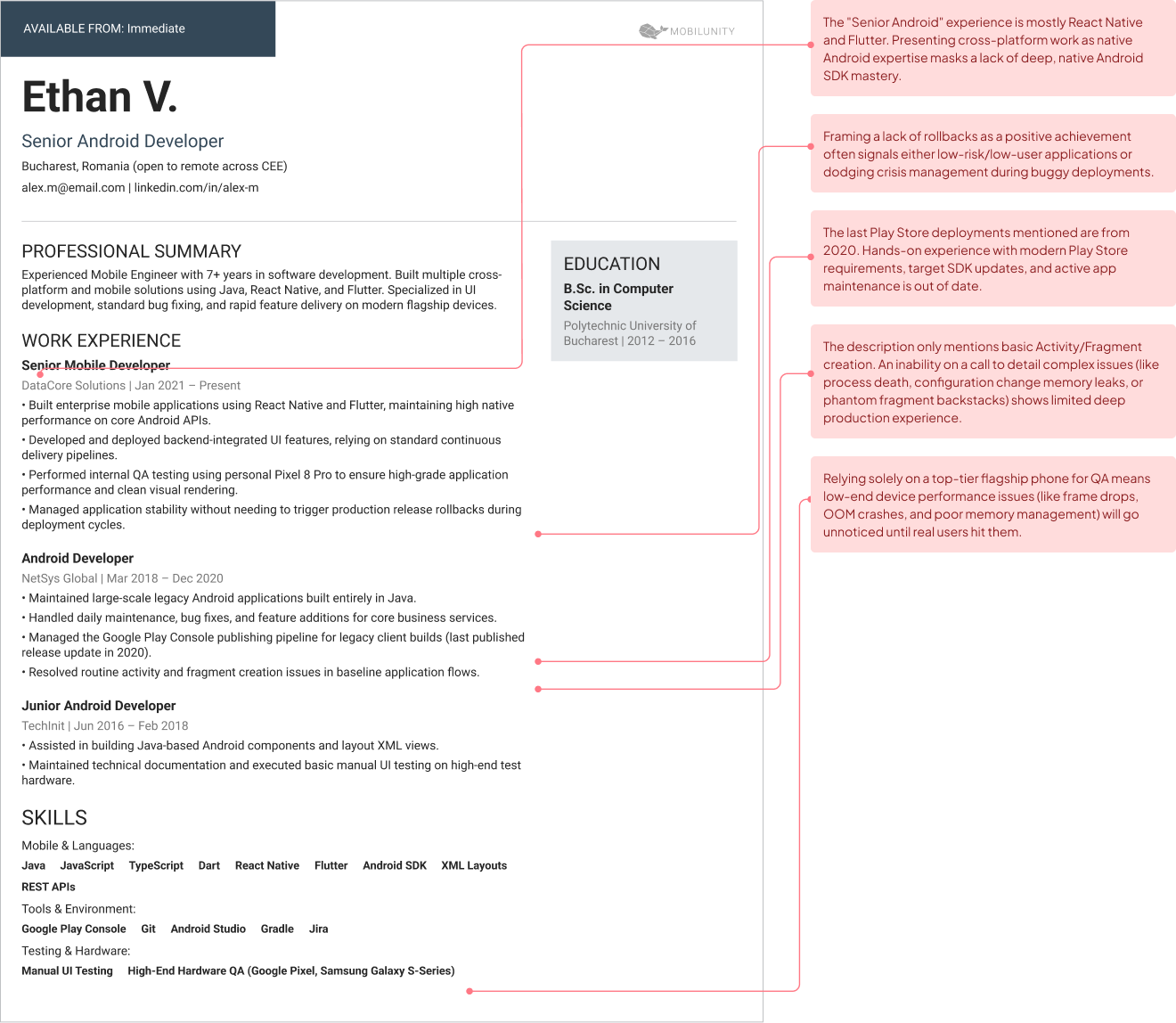
- Java-only experience, with nothing recent in Kotlin. This usually means the candidate has been maintaining an older codebase rather than building new features, which is a narrower hire than the CV title suggests.
- No app in the Play Store, or one that has not been updated in years. This often means the candidate’s hands-on experience is stale even if their resume lists recent employment. Ask directly what they shipped and when.
- No example of a difficult lifecycle bug. When pressed, an inability to describe a specific one usually means the candidate has not done enough production work to have hit it, regardless of how confidently they can define the concept in the abstract.
- Never rolled back a release. This is a milder flag on its own, since some developers are simply lucky or work on lower-risk apps, but combined with any of the other five, it is worth a direct follow-up question.
- Testing only on their own flagship device. Never testing on a representative low-end handset is a strong predictor of unnoticed performance bugs reaching real users.
- Cross-platform experience presented as native experience. Flutter or React Native work listed on a CV as if it were native Android experience is a mismatch worth catching before an offer, not after, since the two skill sets do not transfer as cleanly as candidates sometimes imply.
None of these six flags is individually disqualifying. A strong junior candidate may have no rolled-back release simply because they have not been senior enough to own that decision yet. A candidate moving from cross-platform into native Android work for the first time is not lying by including that experience, provided they are candid about the distinction when asked.
What matters is the pattern across several flags together, and how directly the candidate responds when a flag is raised directly. A defensive or evasive response to a fair question is a more reliable signal than any single flag on its own.
When you do raise a flag directly, phrase it as a genuine question rather than an accusation. “Walk me through a release that didn’t go as planned” gets a more honest answer than “I notice you’ve never mentioned a failed release, is that because you haven’t had one?” The first invites a real story; the second invites a defensive denial, even from a candidate who has nothing to hide.
This same caution applies if you are evaluating a candidate or a vendor for offshore Android development: the six flags above work the same way regardless of where the developer is based, and a dedicated development team with a proper vetting process should be catching these before a candidate ever reaches you.
One flag worth adding to the list, specific to remote and offshore hiring: vague or shifting answers about which time zone the candidate actually works in, or how much overlap they can genuinely offer with your core hours. This is less about honesty and more about expectations, since a developer who is candid about limited overlap from the start is a far easier hire to plan around than one who quietly stretches their schedule for the first few weeks and then cannot sustain it.
How Long It Takes, Brief to First CV
A clear brief typically produces a first shortlist of CVs within five business days, often sooner, when working with a dedicated-team provider that has an existing bench of vetted Android talent.
Week 1: You share your requirements, Mobilunity starts sourcing and screening against required skills, and you receive the first CVs of relevant candidates within 5 business days.
Week 2: You run the interview questions and, if useful, send the screening task to check their technical expertise. If a candidate is a clear fit, you move to an offer and onboarding.
Week 3 and beyond: If the first candidates aren’t the right match, the search continues based on your feedback, focusing more closely on the skills and experience the project requires.
Week one is mostly about specification: confirming the seniority level, the Kotlin-versus-cross-platform decision, and whether Jetpack Compose experience is a hard requirement or a nice-to-have. Vague briefs at this stage are the single biggest cause of a slow search later on.
Android generally staffs at roughly the same speed as Java, since the talent pools overlap heavily and Kotlin is a comparatively approachable language for experienced developers to pick up. This is meaningfully faster than more niche stacks, where a smaller talent pool means a longer search even with an aggressive recruiting effort.
Two things most commonly push the timeline out: making Jetpack Compose experience a hard requirement, since plenty of strong Android developers are still primarily View-based, and needing iOS staffed in parallel, which doubles the search rather than just adding to it.
A dedicated team engagement compresses the timeline further than a from-scratch search, since vetting and initial screening have already happened before the candidate reaches you.
Once a developer is selected, onboarding starts with access to the codebase, development tools, and project documentation. Your team then walks them through its workflows, coding standards, and review process before assigning their first real task.
A realistic first task for week one is a small, low-risk bug fix or a minor feature, not a piece of core architecture. This lets a new hire learn the codebase’s actual conventions, not just its documented ones, before they are trusted with a decision that would be expensive to get wrong. Most experienced Android developers expect this and read it as a sign of a well-run team rather than a lack of trust.