
Best Sites to Hire Mobile App Developers: Top Picks for Fast Hiring

Key takeaways:
With a shared codebase, you can build the same app for iOS and Android. Many cross-platform frameworks also let you develop a web version from the same codebase. In August 2026, iOS accounted for 60.68% of US mobile operating system use, while Android held 67.61% worldwide.
Since both platforms have large user bases, many products need to work well on iOS and Android. Cross platform mobile development allows you to share much of the code and engineering effort instead of maintaining two separate apps. You still need to test each platform, prepare separate builds and releases, and write native code for some features. Native development may be a better fit for apps that rely heavily on platform-specific APIs, advanced graphics, or extensive native customization.
Cross-platform development lets you build an app for multiple operating systems while reusing some or most of the same code. Each framework handles this differently, which affects how the app works and what skills your developers need.
Flutter uses Dart and creates its own interface instead of using standard iOS and Android UI components. This makes it easier to keep the app’s design consistent across platforms. Developers working with Flutter need experience with both Dart and Flutter’s widget system.
React Native takes a different approach. Developers write most of the app in JavaScript or TypeScript, while React Native uses native iOS and Android components for the interface. This can make cross platform mobile development a practical choice for teams that already have JavaScript or React experience.
Kotlin Multiplatform gives teams more choice over how much code they share. Developers can reuse Kotlin business logic across iOS and Android while creating a separate native interface for each platform. With Compose Multiplatform, they can also share the UI when it suits the product.
Web-based frameworks offer another approach. Ionic lets developers build the app with HTML, CSS, and JavaScript. Capacitor then packages that web code as a native app and provides access to device features such as the camera and notifications.
These approaches affect more than the technology behind the app. Your framework choice influences how native the app feels, the performance it can deliver, and the skills you need on your development team.
Many products also need to serve users on both platforms. As of August 2026, iOS dominated mobile use in the US, while Android remained the leading mobile operating system worldwide. Cross platform mobile app development gives teams a way to reach both iOS and Android users without maintaining two separate applications.
Cross-platform app development options have changed considerably in recent years. Some older frameworks have reached the end of support, while newer ones are now ready for production use.
Microsoft ended support for all Xamarin SDKs on May 1, 2024. .NET MAUI has replaced Xamarin as Microsoft’s framework for cross-platform .NET development. If you still maintain a Xamarin app, moving off Xamarin is now about keeping the application on supported technology, not simply accessing newer features. Microsoft’s support policy confirms that Xamarin no longer receives official support.
Kotlin Multiplatform reached stable status in November 2023, according to JetBrains. Compose Multiplatform for iOS followed in May 2025. Kotlin teams can now share both the underlying app logic and the interface between iOS and Android.
React Native also went through a major update. Its New Architecture became the default with React Native 0.76 in October 2024. New projects now use the updated renderer and native module system as standard.
Flutter has changed its rendering technology as well. Impeller is now the default renderer for iOS and for Android devices running API 29 or later.
These changes are particularly relevant for apps built between 2019 and 2021. Xamarin is no longer supported, while older Flutter, React Native, and Kotlin projects may need updates to work with current tools and framework architecture.
There is no single best cross platform app development framework for every product. The right choice depends on your team’s skills, UI needs, native features, and how much code you want to share. For cross-platform mobile development, these 5 frameworks cover the main options available in 2026.
| Framework | Language | How It Draws UI | Maintainer | Best For | Watch Out For |
| Flutter | Dart | Draws its own widgets | Products that need a consistent UI across platforms | Dart creates a smaller hiring pool than JavaScript | |
| React Native | JavaScript, TypeScript | Renders platform-native views | Meta | Teams with React and JavaScript experience | Native modules may still require iOS or Android expertise |
| Kotlin Multiplatform + Compose Multiplatform | Kotlin | Native UI or shared Compose UI | JetBrains | Kotlin and Android teams that want flexible code sharing | iOS expertise remains useful, especially with native UI |
| .NET MAUI | C#, XAML | Uses native platform controls through a shared UI framework | Microsoft | .NET teams and Xamarin migrations | Best fit when your team already works with .NET |
| Ionic + Capacitor | HTML, CSS, JavaScript, TypeScript | Runs web UI inside a native app | Ionic | Web teams building relatively straightforward mobile apps | Less suited to apps with demanding native functionality |
The main cross-platform frameworks compared above suit different products and development teams. Flutter focuses on UI consistency, React Native suits teams that already work with React, while Kotlin Multiplatform offers more flexibility in how much code teams share.
Flutter works particularly well when you want a consistent interface across iOS and Android. It draws its own widgets instead of using each platform’s standard UI components. Flutter’s Impeller renderer is now the default on iOS and Android API 29 and later.
Flutter makes it easier to keep the UI consistent across platforms because it uses its own rendering system. Hiring can be more challenging, though. Dart has a smaller talent pool than JavaScript, Kotlin, or C#, so finding experienced Flutter developers may take longer when you need to grow the team.
React Native works well for companies that already use React for web development. Developers work mainly with JavaScript or TypeScript, so they can reuse many of their existing frontend skills.
Expo can also simplify the build process. EAS Build creates Android and iOS builds in the cloud, which reduces the need to manage build infrastructure locally. For teams that use offshore React Native development, this can also simplify setup across developers working from different locations.
React Native doesn’t eliminate native development completely. Apps that rely on platform-specific SDKs or custom native features may still require Swift, Objective-C, Kotlin, or Java.
Kotlin Multiplatform gives you more control over how much code you share between iOS and Android. You can start with networking, authentication, data handling, and other business logic while keeping a separate native interface for each platform. JetBrains supports gradual adoption, so you can introduce Kotlin Multiplatform without rebuilding the entire app.
Compose Multiplatform lets you share the interface as well. Teams can reuse individual screens or build most of the UI in Kotlin, while keeping native views where necessary. This approach can work particularly well for teams that already have Android and Kotlin experience.
.NET MAUI is a practical option for organizations that already work with C# and .NET. It lets developers build native mobile and desktop apps from a shared C# and XAML codebase.
It also gives teams a route for migrating older Xamarin projects. Microsoft ended Xamarin support in May 2024 and provides guidance for moving Xamarin.Forms and other Xamarin projects to .NET MAUI.
Ionic with Capacitor offers web teams a relatively direct route into mobile development. Developers can keep working with HTML, CSS, and JavaScript or TypeScript. Capacitor then packages the web application as a native app and connects it to device APIs.
Reusing existing web skills and code can reduce Ionic app development cost, especially if you already have web developers or an existing web product. However, Ionic becomes less suitable when the app relies heavily on native features, complex animations, or platform-specific behavior.
Capacitor also supports migration from older Cordova applications, so there’s no need to treat Cordova as a separate framework choice. Xamarin is no longer a current option because Microsoft ended support in 2024.
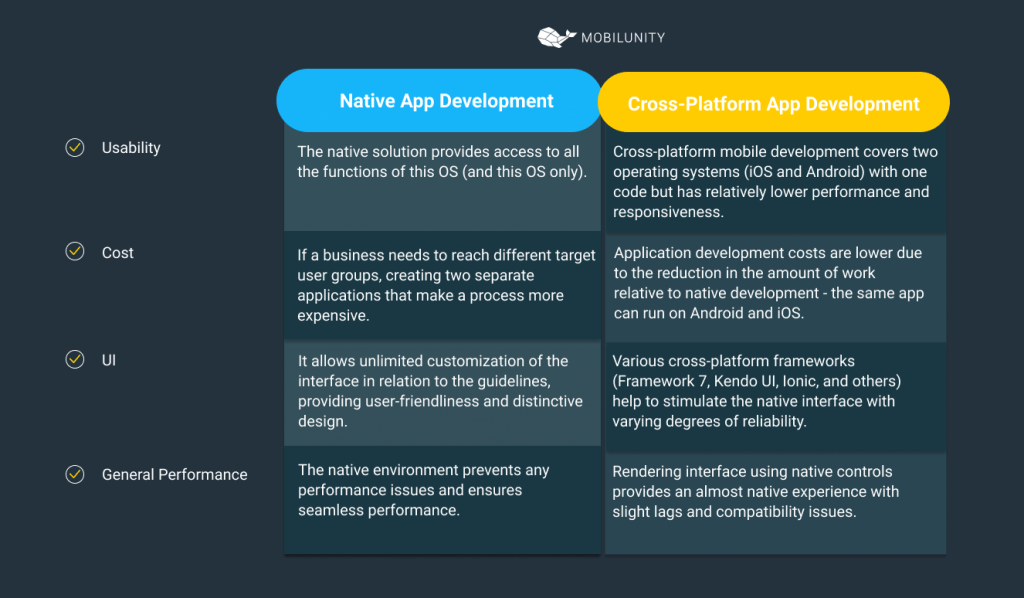
The right approach depends on your product and the skills your engineering team already has. When considering native vs cross platform app development, look first at the features you need and how much platform-specific work they involve.
If you’re choosing between native or cross-platform development, cross-platform often works well when iOS and Android need similar features, and one team will maintain both apps. Native development may be a better choice when your app relies heavily on platform APIs or requires the highest possible performance.
| Your Situation | Better Fit | Why |
| You already have a web team | Cross-platform | React Native or Ionic lets developers reuse JavaScript, TypeScript, and web experience |
| You have an Android and Kotlin team | Cross-platform | Kotlin Multiplatform lets you share business logic while keeping native UI where needed |
| Your app relies heavily on AR, Bluetooth, background processing, or other platform APIs | Native | Direct access to iOS and Android APIs reduces the need for framework-specific integrations |
| You’re building a graphics-heavy game | Native | Native development gives you more control when graphics and performance are central to the product |
| You’re building a content, marketplace, or commerce app with similar features on iOS and Android | Cross-platform | One team can build and maintain much of the same functionality for both platforms |
| You already have established iOS and Android teams | Native | Keeping the existing setup may make more sense than introducing another framework |
Cost is another factor to consider. If you’re looking at native Android development, compare what Android developers cost with the cost of running one shared cross-platform team. Remember that two native codebases also require separate development and ongoing maintenance.
An offshore Android team can reduce native development costs without changing how you build the app. You keep the native Android codebase but hire developers outside your local market.
Native development is often a better fit when the product relies heavily on platform APIs, requires maximum performance, or already has separate native teams. A cross-platform framework can make more sense when both apps need similar features and one engineering team will build and maintain them.
Sharing code between iOS and Android can save development time, but some tasks still need platform-specific work. Native integrations, OS updates, builds, and testing are common examples.
Native modules can add extra development work. Payment systems, maps, Bluetooth devices, and hardware SDKs may not support cross-platform frameworks as quickly as native platforms. Developers may need to add native code or investigate issues across several layers. One developer on Reddit described the challenge simply: “With any cross platform systems you are likely going to have to spend a lot of time on debugging.”
New iOS and Android releases can create delays as well. Apple and Google introduce new APIs first, while cross-platform frameworks and plugins need time to add support. If your app depends on a new platform feature, account for this delay in your release schedule.
iOS builds have an additional requirement. According to Flutter’s documentation, Xcode runs on macOS, so you need a Mac for local iOS builds. Alternatively, Expo EAS Build lets you create Android and iOS binaries in the cloud. This can make offshore mobile development easier when developers work from different locations or use different hardware.
You still need to test the app separately on each platform. Accessibility, navigation, permissions, and other behaviors can work differently on iOS and Android. Someone familiar with both platforms should check how the app works on each one.
These requirements don’t make cross-platform development a poor choice. They are simply part of the work you need to include when planning your timeline, budget, and team.
The cost difference comes mainly from how many people you need and how much work gets repeated. Native development requires separate iOS and Android engineers, with each team building the same features for its platform.
A cross-platform team can share much of this work. One Flutter or React Native team builds features for both platforms, while native specialists step in when the app requires platform-specific work.
The rates below show how Mobilunity’s monthly gross costs compare across native and cross-platform technologies at different experience levels.
Mobile Developers Monthly Costs with Mobilunity*
| Technology | Junior | Middle | Senior |
| iOS | $2,650-$3,800 | $3,750-$6,000 | $5,950-$7,200 |
| Android | $2,650-$3,800 | $3,750-$6,000 | $5,950-$7,200 |
| Flutter | $2,350-$3,200 | $3,450-$5,500 | $5,250-$6,500 |
| React Native | $2,250-$3,300 | $3,450-$6,000 | $5,950-$7,000 |
*As per Mobilunity’s in-house tech recruiting team research done in September 2026
The savings don’t come from lower developer rates. A senior Flutter or React Native developer may actually cost more per month than a native developer. The cost difference comes from needing fewer engineers to build and maintain apps for both platforms.
Cross-platform development also reduces repeated work across the wider team. With separate native teams, each feature needs its own iOS and Android implementation and testing. Design changes may require updates to both apps as well. A cross-platform team can share more of the development, QA, and design work, while native specialists step in when needed.
A strong cross-platform developer needs more than experience with a specific framework. They should understand how shared code works with native iOS and Android and know how to take an app through release.
Start by testing their framework skills, but avoid trivia questions. Ask the developer to build or review a real screen and explain the choices they made. If you plan to hire Flutter developers, check how they structure widgets, manage state, work with APIs, and troubleshoot platform-specific issues.
Native development skills are also important. A developer doesn’t need the same level of experience with Swift and Kotlin, but they should know at least one. This knowledge helps when a plugin can’t handle a required feature or the app needs a native bridge.
Release experience is another skill worth checking. Ask candidates about an app they personally released through TestFlight and Google Play testing tracks. If you hire React Native developers, find out whether they managed the builds and store releases themselves or another team member handled them.
Performance skills can be difficult to assess from a CV alone. Give the candidate a slow screen and ask them to identify the cause. They should explain what they would measure, how they would locate the bottleneck, and how they would fix it.
Keep the technical task focused on work developers actually do. Give candidates 90 minutes to build one screen that loads data from an API, stores it for offline use, and runs on both iOS and Android. This task shows how they structure code, handle data, solve problems, and work across both platforms.
Founded in 2010 in Kyiv, Mobilunity builds dedicated Flutter, React Native, iOS, and Android teams that work under the client’s direction. This model suits companies that need a mobile app development team but want to keep product management and technical decisions in-house.
We have built 30+ mobile teams and provided over 1,000 mobile developers available for sourcing through our network. We have delivered 10+ Flutter projects. Our skilled tech recruiters can staff individual engineers or assemble a larger team based on the client’s development needs.
Our company also gives you access to native specialists when a cross-platform project requires Swift or Kotlin expertise. They can handle native modules, platform integrations, and features that require platform-specific development.
One example is Zenchef’s restaurant booking platform. Mobilunity has provided dedicated developers to Zenchef since 2016, with the project covering technologies such as Kotlin and Swift. Mobilunity also has a 4.7 rating based on 18 reviews on Clutch as of September 2026.

Disclaimer: All salaries and prices mentioned within the article are approximate numbers based on the research done by our in-house Marketing Research Team. Please use these numbers as a reference for comparison only. Feel free to use the contact form to inquire on the specific cost of the talent according to your vacancy requirements and chosen model of engagement.
Client Testimonial
Mobilunity provides an excellent and efficient tech talent service. All my staffing requests, even for niche technologies, were fulfilled in a 2 to 4-week time period, with top-notch candidates. Besides that, I like the caring environment that the Mobilunity team provides for the developers and ensures that everybody is able to work without distractions.
I strongly recommend Mobilunity as a tech talent partner!

Waldemar Biller
Head of Technology








Fulltime dedicated teams, FLEX on-demand model, consultancy, recruitment, EOR